Kubernetes Deployment
This guide covers deploying django-ray to Kubernetes.
Prerequisites
- Kubernetes cluster (Docker Desktop, k3d, kind, or cloud provider)
- kubectl configured to access your cluster
- Docker for building images
Quick Start
1. Build Images
# Build Django application image
docker build -t django-ray:latest .

# Build Ray worker image
docker build -f Dockerfile.ray -t django-ray-worker:latest .
2. Deploy
# Deploy using Kustomize
kubectl apply -k k8s/overlays/dev

# Wait for pods
kubectl wait --for=condition=available deployment/postgres -n django-ray --timeout=120s
kubectl wait --for=condition=available deployment/ray-head -n django-ray --timeout=180s
kubectl wait --for=condition=available deployment/django-web -n django-ray --timeout=180s
kubectl wait --for=condition=available deployment/django-ray-worker -n django-ray --timeout=180s
3. Access
Print the URLs for the active local access path:
With the default NodePort-oriented manifests, use:
| Service | URL | Description |
|---|---|---|
| Django Web | http://localhost:30080 | Application |
| API Docs | http://localhost:30080/api/docs | Swagger UI |
| Admin | http://localhost:30080/admin/ | Django Admin |
| Ray Dashboard | http://localhost:30265 | Ray monitoring |
The Django Web URL opens the bundled testproject landing page:
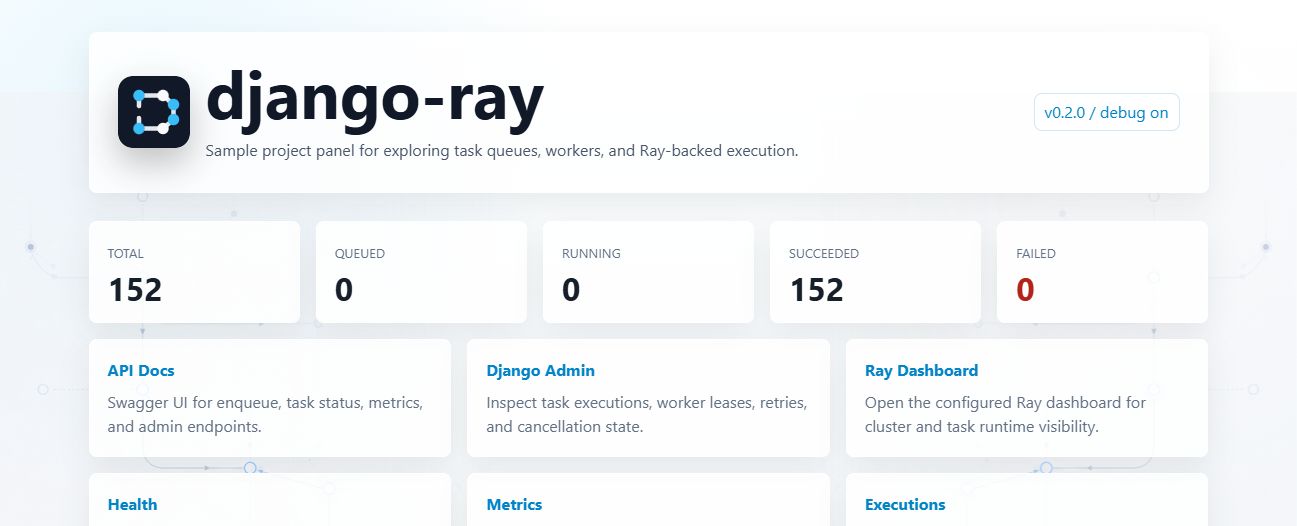
The dev, local, dev-tls, kuberay-kind, and kong-local overlays are local-demo
examples. Their health probes are public, but all other API routes require the bearer token
from DJANGO_API_TOKEN:
Authenticate the Sample Dashboard
The landing page never receives DJANGO_API_TOKEN from Django. To use Run test task,
Metrics, Executions, and authenticated statistics refreshes, retrieve the local demo token
from the Kubernetes Secret and paste it into Browser API access.
On PowerShell:
$encodedApiToken = kubectl get secret django-ray-secret -n django-ray -o jsonpath='{.data.DJANGO_API_TOKEN}'
$apiToken = [Text.Encoding]::UTF8.GetString([Convert]::FromBase64String($encodedApiToken))
$apiToken
On a POSIX shell:
kubectl get secret django-ray-secret -n django-ray \
  -o jsonpath='{.data.DJANGO_API_TOKEN}' | base64 --decode
printf '\n'
These commands intentionally print the credential, so run them only in a trusted terminal. The dashboard clears the password field after submission and keeps a valid token only in the loaded page's JavaScript memory. It does not put the token in rendered HTML, browser storage, cookies, or URLs. Select Forget token or reload the page to clear it. A missing token produces a prompt; invalid or otherwise unverifiable candidates are discarded rather than retained.
This flow is intended for trusted local demos. Do not pass bearer tokens in query strings, and do not expose the sample dashboard over an untrusted network or plaintext HTTP. Production front ends should use an appropriate identity and session model instead of distributing one operator token.
For a production deployment, start from k8s/base (or copy it into an environment overlay),
replace the placeholder Secret through an external secret manager, and set an explicit host in
DJANGO_ALLOWED_HOSTS. The production mode rejects missing or weak Django/API secrets,
DEBUG=True, and wildcard hosts before Gunicorn starts.
The base web readiness and liveness probes connect to the pod IP but explicitly send
Host: django-ray.example.com, matching the base allow-list. A production overlay that changes
DJANGO_ALLOWED_HOSTS must patch both probe httpHeaders values to one of its accepted application
hosts; do not add dynamic pod IPs or a wildcard to the allow-list. The local-demo overlays instead
send Host: django-ray.localhost. The Kong local overlay deliberately uses a TCP readiness probe and
process liveness probe for its overload-testing profile, while its HTTP startup probe sends the same
local host header.
When using the Kong local overlay on Docker Desktop's managed kind cluster, use:
| Service | URL | Description |
|---|---|---|
| Django Web | http://localhost:30080 | Application through Kong |
| API Docs | http://localhost:30080/api/docs | Swagger UI |
| Admin | http://localhost:30080/admin/ | Django Admin |
| Grafana | http://grafana.localhost:30080 | Grafana through Kong |
| Prometheus | http://prometheus.localhost:30080 | Prometheus through Kong |
| Ray Dashboard | http://ray.localhost:30080 | Ray monitoring through Kong |
The sample app reads RAY_DASHBOARD_URL from the deployment config, so Django admin deep links
track the active local access model instead of assuming the old dashboard NodePort.
For non-local clusters, override the printed host, scheme, or ports instead of relying on
the Docker Desktop defaults. K8S_URL_HOST changes the host for every default NodePort
URL, while K8S_WEB_URL, K8S_RAY_DASHBOARD_URL, K8S_GRAFANA_URL, and
K8S_PROMETHEUS_URL are per-service full URL overrides:
make k8s-urls K8S_URL_HOST=my-load-balancer.example.com K8S_WEB_PORT=80 K8S_GRAFANA_PORT=3000 K8S_PROMETHEUS_PORT=9090
make k8s-urls K8S_WEB_URL=https://app.example.com K8S_RAY_DASHBOARD_URL=https://ray.example.com K8S_GRAFANA_URL=https://grafana.example.com K8S_PROMETHEUS_URL=https://prometheus.example.com
make k8s-urls-kong K8S_KONG_WEB_URL=https://app.example.com K8S_KONG_RAY_DASHBOARD_URL=https://ray.example.com K8S_KONG_GRAFANA_URL=https://grafana.example.com K8S_KONG_PROMETHEUS_URL=https://prometheus.example.com
KubeRay Operator (Kind Recommended)
For local multi-node clusters (like kind with 5 nodes), use the KubeRay-managed path.
The example RayCluster uses the upstream rayproject/ray image. The Django task
manager sends project code and dependencies through the persisted RuntimeEnv
profile, so changing a Python dependency does not require rebuilding Ray head and
worker images. See Runtime Environments.
The local example builds an immutable source ZIP during django-setup, stores it
on runtime-env-pvc, and mounts that volume at /runtime-env in every Ray pod.
The task manager selects its file:///runtime-env/django-ray-source.zip URI while
continuing to use Ray Client. Production deployments should use an immutable
HTTPS, S3, or GCS archive on storage reachable from every Ray node.
Storage requirement:
runtime-env-pvcusesReadWriteMany(RWX) because the setup job, Django workers, and every Ray pod must see the same archive. Verify that the cluster has an RWX-capable StorageClass/provisioner before deploying this example. A cluster whose available storage only supportsReadWriteOncewill leave the PVC and dependent pods Pending. Install an RWX provisioner, explicitly select an RWX-capable StorageClass, or use a shared HTTPS/S3/GCS archive instead.
This keeps Django web/worker Deployments in this repo, but replaces static Ray
Deployments with a RayCluster custom resource.
1. Install Operator + Deploy
# Build app images, load them into kind, install/upgrade KubeRay, deploy overlay
make k8s-deploy-kuberay-kind
If you also want the host-based Kong routes used by the Docker Desktop managed kind setup, install Kong and apply the local ingress overlay:
# One command path
make k8s-deploy-kong-local

# Equivalent manual path
helm upgrade --install kong kong/ingress \
  --namespace kong \
  --create-namespace \
  -f k8s/overlays/kong-local/kong-values.yaml

kubectl apply -k k8s/overlays/kong-local
2. Check Status
3. Cleanup
Notes
- Custom images are still required:
django-ray:latestfor Django web/worker podsdjango-ray-worker:latestfor Ray head/worker pods- Default kind cluster name is
kind. Override when needed:
Architecture
%%{init: {"flowchart": {"curve": "linear"}} }%%
flowchart TD
    subgraph kube["Kubernetes Cluster"]
        postgres["PostgreSQL"]
        web["Django Web<br/>API/Admin"]
        worker["Django-Ray<br/>Worker"]

        subgraph ray["Ray Cluster"]
            head["Ray Head<br/>Dashboard"]
            ray_worker_1["Ray Worker"]
            ray_worker_2["Ray Worker"]
        end

        web <--> postgres
        worker <--> postgres
        web --> head
        worker --> head
        head --> ray_worker_1
        head --> ray_worker_2
endComponents
PostgreSQL
Database for Django and task metadata.
# k8s/base/postgres.yaml
resources:
  requests:
    memory: "256Mi"
    cpu: "100m"
  limits:
    memory: "512Mi"
    cpu: "500m"
Django Web
Web application and API server.
# k8s/base/django-web.yaml
replicas: 1
resources:
  requests:
    memory: "256Mi"
    cpu: "100m"
  limits:
    memory: "512Mi"
    cpu: "500m"
Django-Ray Worker
Task processor that submits to Ray.
# k8s/base/django-ray-worker.yaml
env:
  - name: RAY_ADDRESS
    value: "ray://ray-head-svc:10001"
  - name: DJANGO_RAY_CONCURRENCY
    value: "40"
Ray Cluster
Ray head and worker nodes.
# k8s/base/ray-cluster.yaml
# Ray Head
resources:
  requests:
    memory: "8Gi"
    cpu: "2"
  limits:
    memory: "12Gi"
    cpu: "4"

# Ray Workers (replicas: 2)
resources:
  requests:
    memory: "8Gi"
    cpu: "2"
  limits:
    memory: "12Gi"
    cpu: "4"
Scaling
Scale Ray Workers
Scale Django Web
Adjust Worker Concurrency
Configuration
Environment Variables
Set via ConfigMap:
# k8s/base/configmap.yaml
data:
  DJANGO_DEPLOYMENT_MODE: "production"
  DJANGO_DEBUG: "False"
  DJANGO_ALLOWED_HOSTS: "django-ray.example.com"
  DATABASE_ENGINE: "django.db.backends.postgresql"
  DATABASE_HOST: "postgres-svc"
If the public application host differs, patch DJANGO_ALLOWED_HOSTS and the web readiness and
liveness probe Host headers together in the same production overlay.
Secrets
Set via Secret:
# k8s/base/secret.yaml
data:
  DJANGO_SECRET_KEY: <base64-encoded-random-value-at-least-50-characters>
  DJANGO_API_TOKEN: <base64-encoded-random-value-at-least-32-characters>
  DATABASE_PASSWORD: <base64-encoded>
Before routing traffic to the service, run Django's deployment checks with the same ConfigMap and Secret values used by the web pod:
The /api/livez, /api/readyz, and /api/health endpoints intentionally do not require a
token, so the Kubernetes probes can remain unauthenticated. /api/metrics, task submission,
task results, logs, arguments, and workflow-observability routes are protected.
Overlays
Development (default)
- Lower resource limits
- Single replicas
- Debug enabled
Local (high resources)
- Higher resource limits
- Optimized for powerful machines
TLS Enabled
# Generate certificates first
./scripts/generate-ray-tls-certs.sh

# Deploy with TLS
kubectl apply -k k8s/overlays/dev-tls
See TLS Configuration for details.
Monitoring
View Logs
# All components
kubectl logs -n django-ray -l app=django-ray -f

# Django web
kubectl logs -n django-ray -l app=django-ray,component=web -f

# Worker
kubectl logs -n django-ray -l app=django-ray,component=worker -f

# Ray
kubectl logs -n django-ray -l app=ray -f
Check Task Stats
kubectl exec -n django-ray deployment/django-web -- \
  python manage.py shell -c "
from django_ray.models import RayTaskExecution, TaskState
for state in TaskState:
    count = RayTaskExecution.objects.filter(state=state).count()
    print(f'{state}: {count}')
"
Prometheus Metrics
Metrics are available at /api/metrics:
The bundled Prometheus deployment mounts only DJANGO_API_TOKEN from the application
Secret and uses it as a bearer credential for this scrape. Replace the base placeholder
before deployment and rotate it with the same care as other service credentials.
The scrape pools have separate ownership boundaries. ray-head and ray-workers collect
Ray's native process metrics from port 8080. django-ray collects the durable database
snapshot from the authenticated Django application endpoint. The django_ray_worker
task-manager processes do not run an HTTP server or a per-process metrics exporter; their
durable task and lease state is already represented by the application endpoint. Do not
scrape those pods at port 8000 unless the deployment adds a real, explicitly secured
exporter.
After a fresh deployment, verify that each supported scrape pool has at least one healthy
target and that the removed django-ray-worker pool is absent:
The check waits up to two minutes for Prometheus discovery to converge. Override
K8S_PROMETHEUS_URL for a non-default service address. When upgrading an existing
deployment after changing the Prometheus ConfigMap, reload or restart Prometheus before
running the check:
kubectl rollout restart deployment/prometheus -n django-ray
kubectl rollout status deployment/prometheus -n django-ray --timeout=180s
make k8s-check-prometheus-targets
Troubleshooting
Pods Not Starting
# Check pod status
kubectl get pods -n django-ray

# Check events
kubectl get events -n django-ray --sort-by='.lastTimestamp'

# Describe failing pod
kubectl describe pod <pod-name> -n django-ray
Database Connection Issues
# Check PostgreSQL
kubectl logs -n django-ray deployment/postgres

# Test connection from web pod
kubectl exec -n django-ray deployment/django-web -- \
  python -c "import psycopg; print('OK')"
Ray Connection Issues
# Check Ray head
kubectl logs -n django-ray deployment/ray-head

# Test Ray connection from worker
kubectl exec -n django-ray deployment/django-ray-worker -- \
  python -c "import ray; ray.init('ray://ray-head-svc:10001'); print(ray.cluster_resources())"
Production Recommendations
- Use managed PostgreSQL (RDS, Cloud SQL, Azure Database)
- Enable TLS for Ray cluster communication
- Use KubeRay operator for production Ray clusters
- Configure proper resource limits based on workload
- Set up monitoring with Prometheus/Grafana
- Use proper secret management (Vault, External Secrets)
- Configure Ingress with TLS termination
- Prefer KubeRay operator mode over static Ray Deployments for lifecycle management
See Also
- Docker Deployment - Running with Docker
- TLS Configuration - Securing Ray communication
- Configuration - All settings